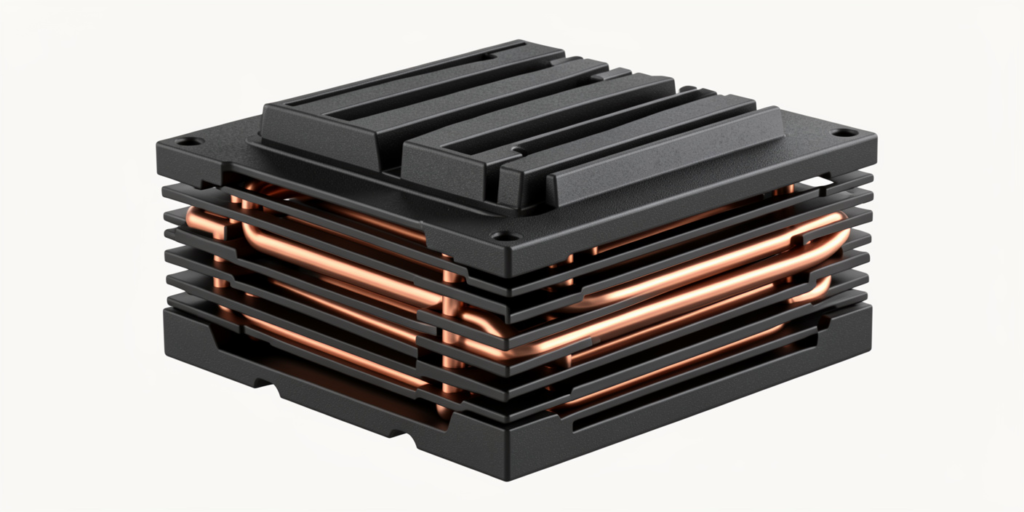

The PS5 heatsink is one of the most important parts of your PlayStation 5’s internal cooling system. Without efficient heat dissipation, your console can overheat, run its fans loudly, or even reduce performance during gameplay. We’ll explain what a heatsink does, how to tell when it needs attention, and how to keep it clean and working well.
Why PS5 Cooling is Important
The PlayStation 5 generates a lot of heat when running demanding games. Efficient cooling ensures that your console operates smoothly and lasts longer. The PS5 heatsink pulls heat away from the CPU and GPU, preventing overheating and potential hardware damage.
How the Heatsink Affects Performance
When the heatsink and other cooling components are clogged or underperforming, the system works harder to stay cool. This can cause loud fan noise, performance throttling, or even unexpected shutdowns. A clean, well-functioning heatsink helps maintain stable performance and reduces stress on internal components.
What is a PS5 Heatsink?
A heatsink is a metal component that absorbs heat from the console’s processor and spreads it out so that the fan can remove the heat efficiently. The PS5 uses a liquid metal thermal interface between the CPU/GPU and the heatsink, which is much more effective than regular thermal paste. This allows the heatsink to maintain optimal temperatures even during intense gaming sessions.
Components of the PS5 Cooling System
The PS5 cooling system consists of several key components:
- Heatsink: Absorbs heat from the processor.
- Fan: Pushes hot air out of the console.
- Liquid metal thermal interface: Transfers heat efficiently from the CPU and GPU to the heatsink.
- Vents: Allow airflow into and out of the console.
Signs Your PS5 Heatsink Needs Attention
- Overheating and High Temperatures: If your PS5 feels unusually hot or displays overheating warnings, it could indicate that it is clogged or not functioning properly.
- Loud Fan Noise: Fans spinning constantly at high speeds are a sign that the heatsink may not be cooling efficiently. Dust and debris can block airflow, forcing the fan to work harder and louder.
- Frequent Crashes or Performance Drops: If games lag, crash, or run at lower frame rates than usual, overheating caused by an ineffective it could be the reason. Keeping the cooling system clean helps prevent these performance issues.
Tools and Materials Needed
Before cleaning or inspecting the PS5 heatsink, gather the following tools:
- Screwdrivers compatible with the PS5
- Compressed air can
- Microfiber cloth
- Soft brush
Safety Precautions Before Starting
- Always power off and unplug your PS5.
- Work in a static-free area.
- Handle internal components gently to avoid damage.
How to Clean Your PS5 Heatsink
- Step 1 – Power Off and Unplug Your PS5: Ensure the console is completely powered down and disconnected from all cables before cleaning.
- Step 2 – Open the Console Carefully: Remove the outer panels slowly, avoiding excessive force. The PS5’s design allows safe access to internal components if handled correctly.
- Step 3 – Remove Dust from the Heatsink: Use compressed air and a soft brush to gently clean dust from the it and fan. Avoid using liquids or excessive force.
- Step 4 – Reassemble and Test: Once cleaned, reattach the panels, plug in the console, and test it. Fans should be quieter, and temperatures should stabilize.
How to Replace Your PS5 Heatsink
Replacing the heatsink or liquid metal interface is an advanced procedure and may void your warranty if the console is still covered. It is recommended to seek professional assistance if you are unsure.
- Step 1 – Remove the Old Heatsink: Carefully detach the old heatsink without damaging other internal components.
- Step 2 – Apply Liquid Metal Correctly: The PS5 uses liquid metal as a thermal interface, which transfers heat more efficiently than traditional paste. Proper application is critical to avoid damaging the console.
- Step 3 – Install the New Heatsink: Place the new heatsink correctly and ensure it makes full contact with the thermal interface.
- Step 4 – Test for Performance and Temperature: After reassembly, test the console under normal gaming loads. The fan should be quieter, and the system should maintain stable temperatures.
Tips for Maintaining Your PS5Heatsink
- Keep Your Console Well-Ventilated: Place the PS5 in a well-ventilated area, away from walls or objects that block airflow.
- Regular Cleaning Schedule: Clean the internal components every 3–6 months to prevent dust buildup that can reduce the efficiency of the PS5 heatsink.
- Avoid Blocking Air Vents: Do not cover the air vents during gameplay, as this can restrict airflow and cause overheating.
Benefits of a Clean or Replaced Heatsink
- Reduced Overheating: A properly maintained PS5 heatsink keeps temperatures under control, preventing potential damage.
- Improved Performance and Stability: With effective cooling, your console can perform at its peak without throttling or crashes.
- Longer Console Lifespan: Good heat management reduces wear on components, extending the overall life of your PS5.
Common Mistakes to Avoid
- Using Excessive Force When Opening the PS5: Forcing panels or screws can damage delicate internal parts. Handle with care.
- Incorrect Liquid Metal Application: Liquid metal is conductive. Applying it incorrectly can cause shorts or damage. Consider professional help if unsure.
- Skipping Regular Maintenance: Neglecting cleaning reduces cooling efficiency, which can lead to overheating and performance issues.
Final Thoughts
The PS5 heatsink is essential for keeping your console cool and running smoothly. Regular cleaning and careful maintenance prevent overheating, reduce fan noise, and prolong the console’s lifespan. Proper care ensures that your PlayStation 5 continues delivering high-performance gaming for years to come.
FAQs
What is a PS5 heatsink?
It is a metal component that absorbs heat from the CPU and GPU, helping the console stay cool during gaming.
How do I know if it needs cleaning?
Signs include overheating, loud fan noise, and frequent performance drops while gaming.
Can I clean it myself?
Yes, you can use compressed air and a soft brush, but always unplug the console and handle parts carefully.
Does replacing it improve performance?
Replacing or maintaining it can reduce overheating and help your console run more smoothly.
How often should I maintain the PS5 heatsink?
It’s recommended to clean or check your heatsink every 3–6 months to prevent dust buildup and overheating.